Version 26.11.15 is now available for DOWNLOAD!
This release primarily fixes and refines issues from the past several releases and adds one new feature.
Audio Mixing Assistant
Choose Timeline > menu > Edit > Audio Mixing Assistant.
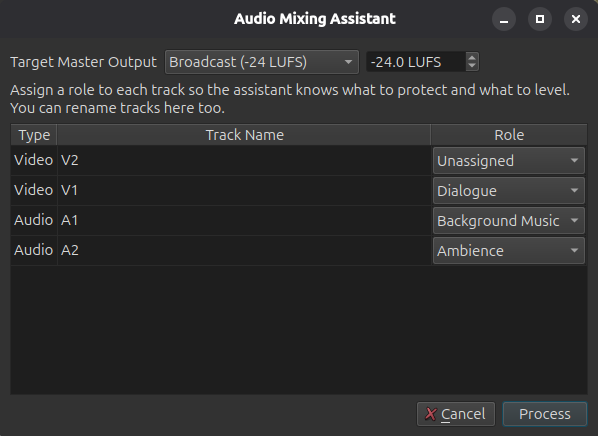
And get recommendations that it can apply.
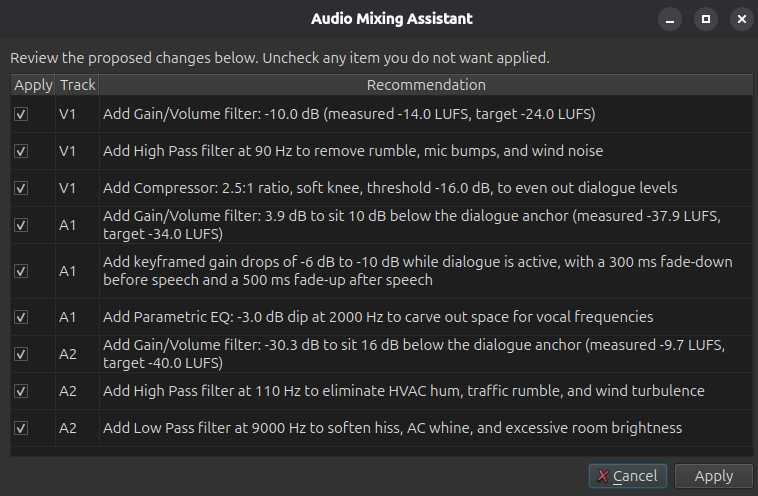
Fixes
- Fixed a crash when drag-n-drop video suggesting conversion when Settings > Timeline > Automatically Add Tracks is on (broke in v26.9).
- Fixed Timeline interactions slow when something is using Windows UI Automation (broke in v26.9).
- Fixed copy and paste of multiple clips including dissolve video transitions (broke in v26.9).
- Fixed audio playback might sound scratchy (broke in v26.9).
- Fixed
Ctrl+mouse-wheel and context menus in the numeric fields of filters on Windows (broke in v26.9). - Fixed crash when using hardware decoding and preview scaling with GPU processing mode (broke in v26.9).
- Fixed scrubbing audio in the Source player (broke in v26.9).
- Fixed pasting filters to a track (broke in v26.9).
- Fixed moving a clip in Timeline with drag-n-drop was slower (broke in v26.9).
- Fixed some VST2 plugins made app hang on start or make the app or export jobs crash on exit (broke in v26.8).
- Typewriter filter: fixed changing the text can temporarily break timing in preview (broke in v26.4).
- Fixed launching Glaxnimate installed to
Program Fileson Windows (broke in v26.4). - Fixed possible crash when drag-moving a clip beyond a transition to end of track.
- Fixed resizing a transition by dragging the clip before it.
- Fixed saving a preset export with
/in the name. - Fixed loading B frames from custom export preset with hardware encoding on.
- Fixed the macOS 27 font dialog does not work.
- Fixed crash opening a file dialog in AppImage/Snap on Ubuntu 26.04.1.
- Fixed snapping to the playhead or a marker is inaccurate when Timeline is zoomed out.
- Subtitle Burn In filter: fixed failing to render beyond an item with blank lines.
- Fixed using Size, Position & Rotate filter on an Adjustment Clip.
Other Changes and Improvements
- Reduced the memory usage of audio transitions.
- Improved the performance of dissolve video transitions in 8-bit processing mode.
- Added Remove Old Program Files to the Windows installer when doing upgrade. This fixes problems caused by old, incompatible DLLs no longer being used.
- Added support for Premiere and Resolve video proxy file conventions:
ProxyorProxiessubfolder, case insensitive, same as source name but possibly different extension, optionally with_Proxysuffix before extension. - Reduced playhead thickness.
- Removed Settings > Player > Audio API > Waveform Audio on Windows. This was a legacy API that was dropped by the SDL library we use for audio output. The new defaults are WASAPI for stereo and DirectSound for multi-channel.
- GPS Graphic filter: optimized drawing by skipping overlapping lines.
- GPS Text filter: added support for decimals X argument for datetime keywords.
- GPS filters: added support for parsing plain text files such as dashcam logs.
- GPS filters: automatically load a companion gps file (with the same name).
- Added support for rectangle parameters to the experimental add-on filter UI generator including a player overlay control (VUI).
- Added a camcorder viewfinder (recording) animation to Elements > Graphics.
- Added a search field (English only) to Elements.
- Added Settings > Shortcuts (an alias for Help > Actions and Shortcuts).
- Added Settings > Timeline > Rounded Rectangles option to turn off that cosmetic feature.
- Added Settings > Timeline > Sync Zoom With Keyframes.
Search
Recent Posts
- Posted on 15 Nov 2026
- Posted on 27 Sep 2026
- Posted on 01 Aug 2026
- Posted on 25 Jun 2026